Copilot does not overshare. Permissions do
Copilot honours your existing permissions exactly. That is precisely the problem — it removes the obscurity that has quietly been holding ten years of file sprawl together.
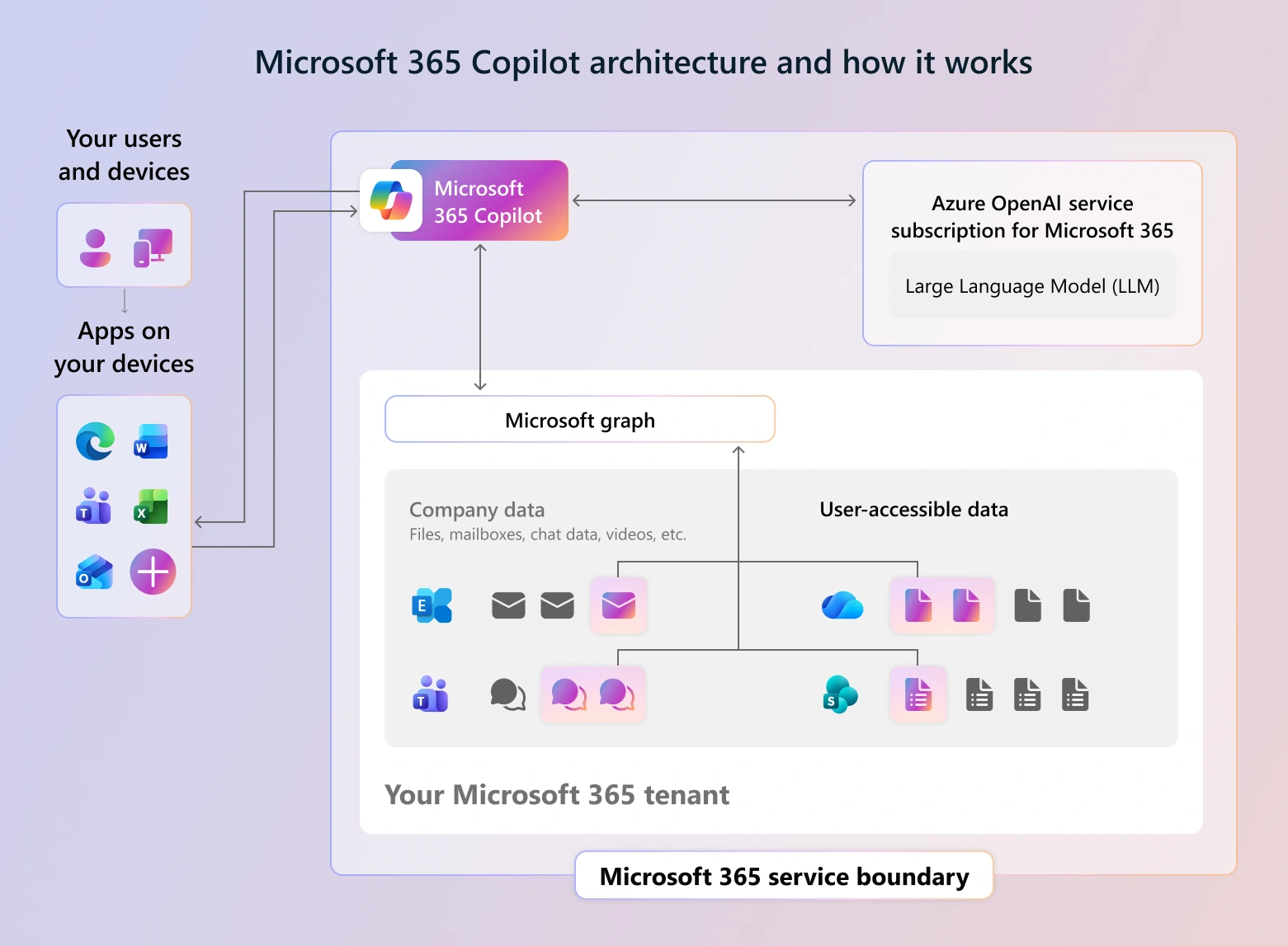
What Copilot actually does
Start with the part Microsoft is right about, because the scare stories usually get it wrong. Microsoft 365 Copilot does not bypass security, does not create new access, and does not train a public model on your tenant. It surfaces content the signed-in user already has permission to open. If a user could find a document by searching for it, they could always read it.
So the common objection — "Copilot leaked our salary data" — is not accurate. Copilot did not leak anything. It answered a question using a file the person asking was already entitled to open.
That is a more uncomfortable finding, not a less one.
The control you did not know you had
For years, permissions in most Microsoft 365 tenants have been wrong in a way that did not matter very much. A finance folder shared with the whole organisation in 2019, a board pack sitting in a Teams site that half the company can reach, a "anyone with the link" share created for one contractor and never revoked.
None of it caused a problem, because finding a specific document required knowing it existed, knowing roughly what it was called, and caring enough to look. Obscurity was doing the work that permissions were supposed to do.
Copilot removes the obscurity. Nobody has to know the file exists or what it is called. They ask a question in plain English and the answer is assembled for them, complete with citations. The permission model has not changed. The effort required to exploit its gaps has collapsed to nothing.
Where the sprawl came from
When we audit tenants ahead of a Copilot rollout, the same six sources account for almost all of it.
- "Anyone with the link" sharing, often the tenant default for years, producing links that never expire and are not attached to any identity.
- Everyone and Everyone-except-external-users granted on sites and libraries during a migration, because it was the fastest way to stop the tickets.
- Lifted-and-shifted file servers. A decade of NTFS permissions translated into SharePoint by a migration tool that faithfully reproduced every historical mistake.
- Teams sprawl. Every team creates a site. Self-service creation means nobody owns the membership, and private channels multiply the problem.
- OneDrive as a shared drive. Individuals sharing folders broadly from personal storage, entirely outside any governance model.
- Departed staff and dormant projects. Sites whose owner left, which nobody can now safely change because nobody knows what depends on them.
The five-minute test
Before committing to a governance programme, get the actual measurement. Enable Copilot for a small pilot group that deliberately includes an ordinary staff member with no special privileges — not just executives and IT, which is the usual mistake, because those people are entitled to see the sensitive material anyway.
Then have that person ask the questions a curious employee would ask on a slow afternoon. What are the salary bands. What is in the latest board pack. What are we paying our largest supplier. Are there any redundancy plans. What did the last performance review cycle conclude about a named colleague.
Whatever comes back was already reachable. The test does not create exposure; it measures it. And it produces something a governance business case usually lacks — a specific, undeniable example to put in front of an executive who thinks permissions are an IT detail.
What to do before you switch it on
- Find the over-shared locations. Prioritise sites containing HR, finance, legal, board and client-confidential material. You do not need to fix the whole tenant before starting — you need to fix the material that would cause a problem.
- Kill organisation-wide and anonymous sharing where it is not deliberate. Remove Everyone-except-external-users from sites that should not have it, and set an expiry on anonymous links so the backlog drains itself over time.
- Restrict Copilot discovery on high-risk sites while you work through them. This is the pressure valve that lets you deploy on a sensible timeline instead of blocking the rollout for a year.
- Apply sensitivity labels to the material that matters, and let the labels carry protection with the file rather than depending on where it happens to live.
- Assign owners to sites that do not have one, and set a review cadence. Permission drift is continuous, so a one-off cleanup buys you eighteen months at best.
- Decide your retention position. Content you no longer hold cannot be surfaced. Retention is the only control here that shrinks the problem rather than managing it.
If you have Copilot licensing you already have SharePoint Advanced Management, which includes the oversharing reports and site access reviews for exactly this work. Purview covers the labelling and DLP side. In most tenants we assess, the tooling required is already owned and simply unconfigured — which is the ordinary state of Microsoft 365 generally.
The honest framing
This is not a Copilot project. It is a data governance project that Copilot has made urgent and, for the first time, fundable.
Every problem above existed before anyone mentioned AI. A departing employee could have found those files. So could a compromised account — and a compromised account is considerably more likely than a curious one. The organisations discovering this during a Copilot pilot are not less secure than they were last year; they are better informed.
Which makes the rollout a genuine opportunity. There has never been a better moment to get funding for permissions work, because for once the business case writes itself and the executive sponsor is already asking for the outcome.
A useful test: ask whoever administers your tenant how many SharePoint sites currently grant access to Everyone-except-external-users, and how many anonymous sharing links are live with no expiry. If those numbers are not available in an afternoon, that is the project — and it needed doing whether or not you buy Copilot.
Get the measurement before the rollout
A tenant assessment covering sharing configuration, over-permissioned sites, orphaned ownership and label coverage — using the tooling your Copilot licensing already includes.